Board Studio for Jira Cloud®

Visualise and Act on Your Work.

From planning to execution, Board Studio gives your teams the clarity and control they need. All inside Jira Cloud®.

Build boards tailored to each audience. Everyone visually in sync, all in real time.

See Work Whole

Move from portfolio intent to issue detail without losing context or switching views

Spot Blockers Early

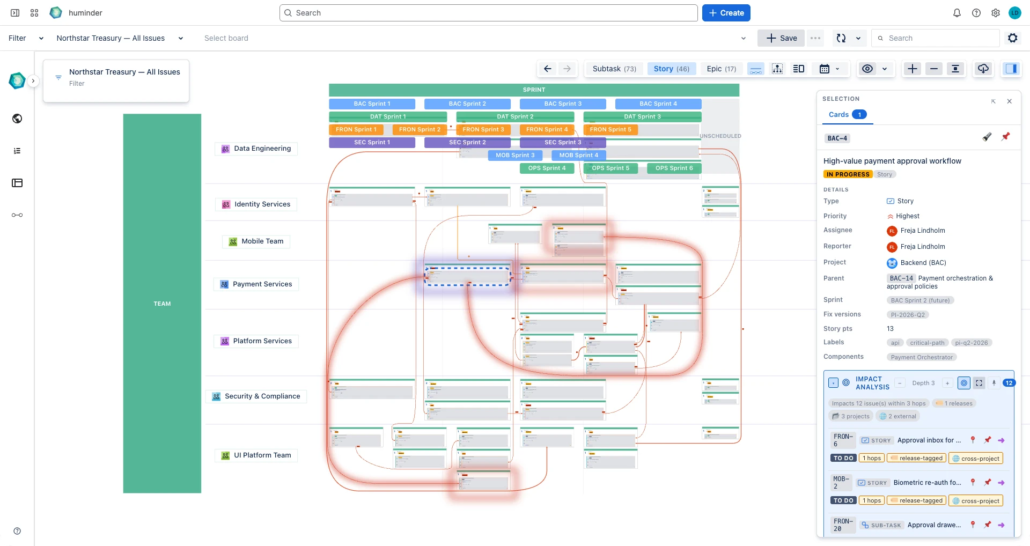
Readable, live dependency paths reveal risk, ownership and cycles before they derail delivery.

Run Your Way

Make every board reflect your operating model, so decisions follow the measures that matter.

End Status Theatre

Share live cross-project reality from Jira, replacing stale decks and reconciliation meetings.

Who this is for

You

See the big picture at your level. No title required. See it, contribute efficiently, act to ship.

Delivery Managers & Scrum Masters

Track cross-team blockers and release readiness across sprints, without chasing updates.

Engineering | Business Leaders & CxOs

Get a reliable delivery picture across the organisation. Know what’s at risk before the next leadership review.

PMOS & PORTFOLIO MANAGERS

Replace PowerPoint dependency maps and manual status meetings with a live Jira view.

RTES & SAFE TEAMS

Run PI Planning sessions with full visibility into features, dependencies, and team capacity across your Agile Release Train.

See it in action

Features at a Glance

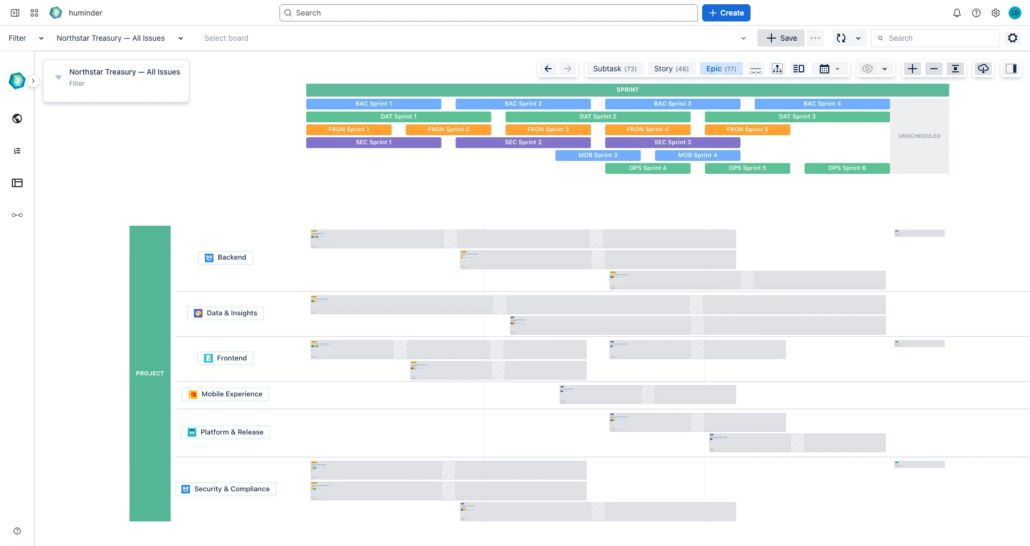
SEMANTIC ZOOM: PORTFOLIO → DETAIL IN ONE BOARD

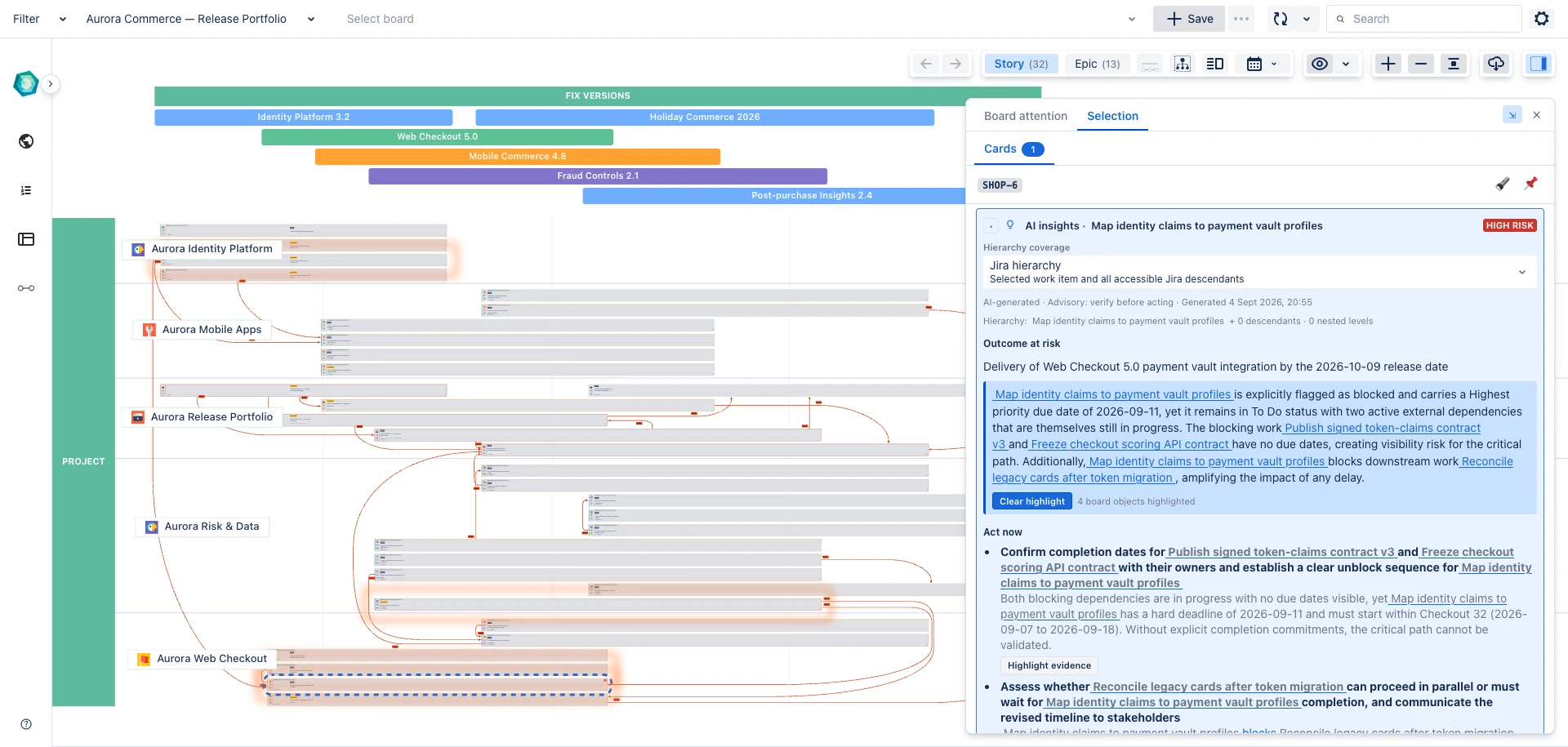
Zoom smoothly from program-level view to card-level detail without switching pages or losing context. Ideal for exec overview and team planning.

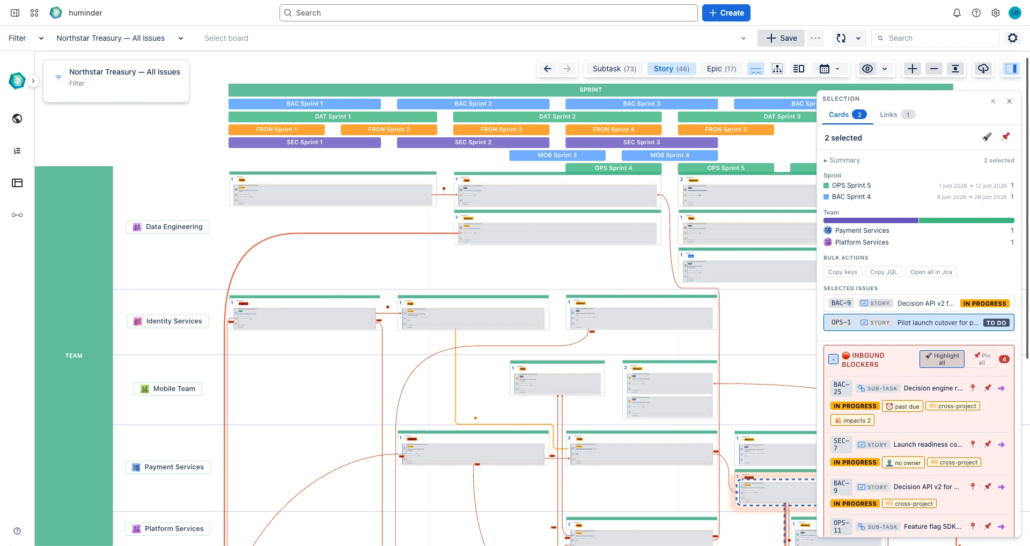
DEPENDENCIES YOU CAN READ

Make link types obvious at a glance with configurable edge colour, thickness. Industrial-strength layout and routing engine make the picture always clear.

CARDS YOU CONTROL (FIELDS + ROLLUPS)

Choose exactly what appears on each card and roll up key metrics from child work items, so the board reflects how you run the business, not a generic template.

UNLIMITED NESTED SWIMLANES + GROUPING

Build the hierarchy you actually use at each hierarchical level, by any Jira field, at any depth. No forced levels, no “one size fits all.”

SMART SORTING WITH BUSINESS LOGIC

Board Studio detects field semantics and applies sensible asc/desc defaults, reducing manual board maintenance.

CROSS-PROJECT, SHAREABLE VIEWS THAT STAY LIVE

Pull work from any filter/project and share the same board org-wide. Everything stays synced in real time with Jira.

UP AND RUNNING IN MINUTES

Guided exploration walks you through every feature. Restart any time.

ENTERPRISE-READY EXPERIENCE

27 languages, light/dark mode matching Jira, touch/tablet support.

How it works

Connect your Jira. No data preparation.

Use any saved JQL filter, space as your starting point.

Combine work from one team or dozens without duplicating data or changing your Jira configuration.

Board Studio works directly with your existing Jira structure.

Turn complex Jira data into a visual board.

Build boards that match the way your organization actually works, from Epics down to Stories and Subtasks.

Create unlimited swimlanes and groups based on any Jira field, including custom fields. Show only the dependencies that matter, control exactly what appears, and tailor every aspect of the visualisation.

Find answers in seconds.

Instead of digging through issues, instantly focus on the information you need.

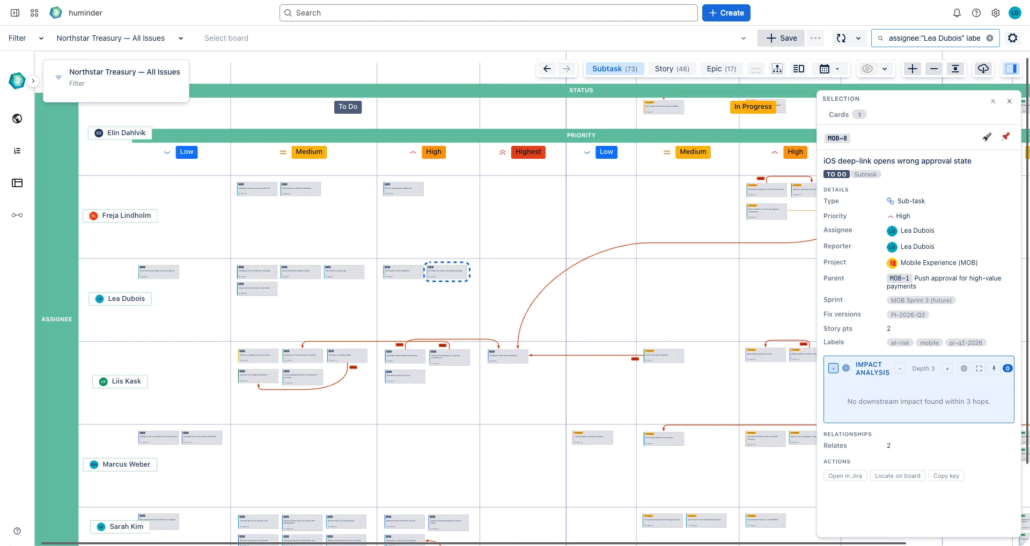
Explore your data with Advanced search, Inspector, Focus Mode, and Blast View. Rearrange dimensions, reorganise swimlanes, and experiment with different perspectives.

Keep everyone aligned.

Save and share board configurations across your organisation so everyone works from the same visual model.

As Jira changes, your boards update automatically in real time, giving teams and stakeholders a shared, always-current view of programmes and delivery.

Use Cases

Cross-Team Dependency Management

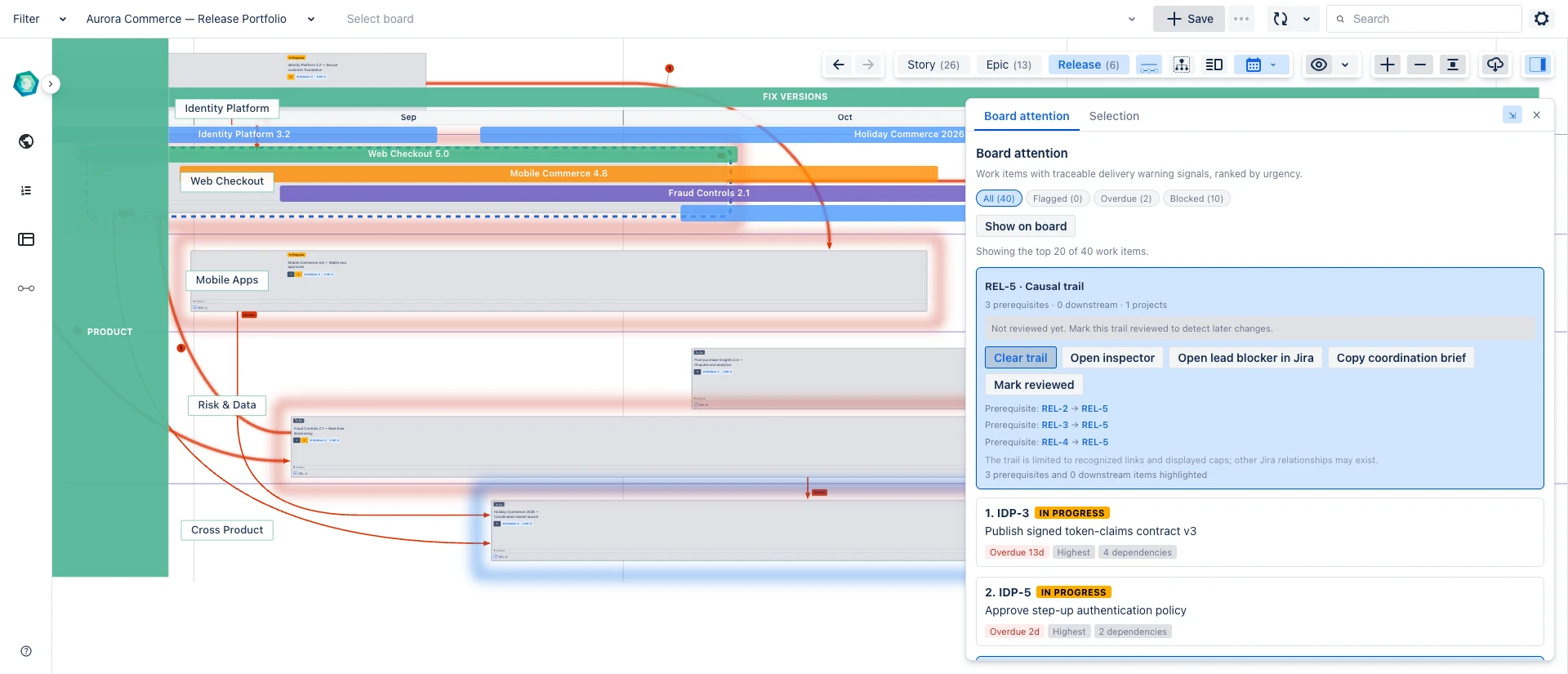
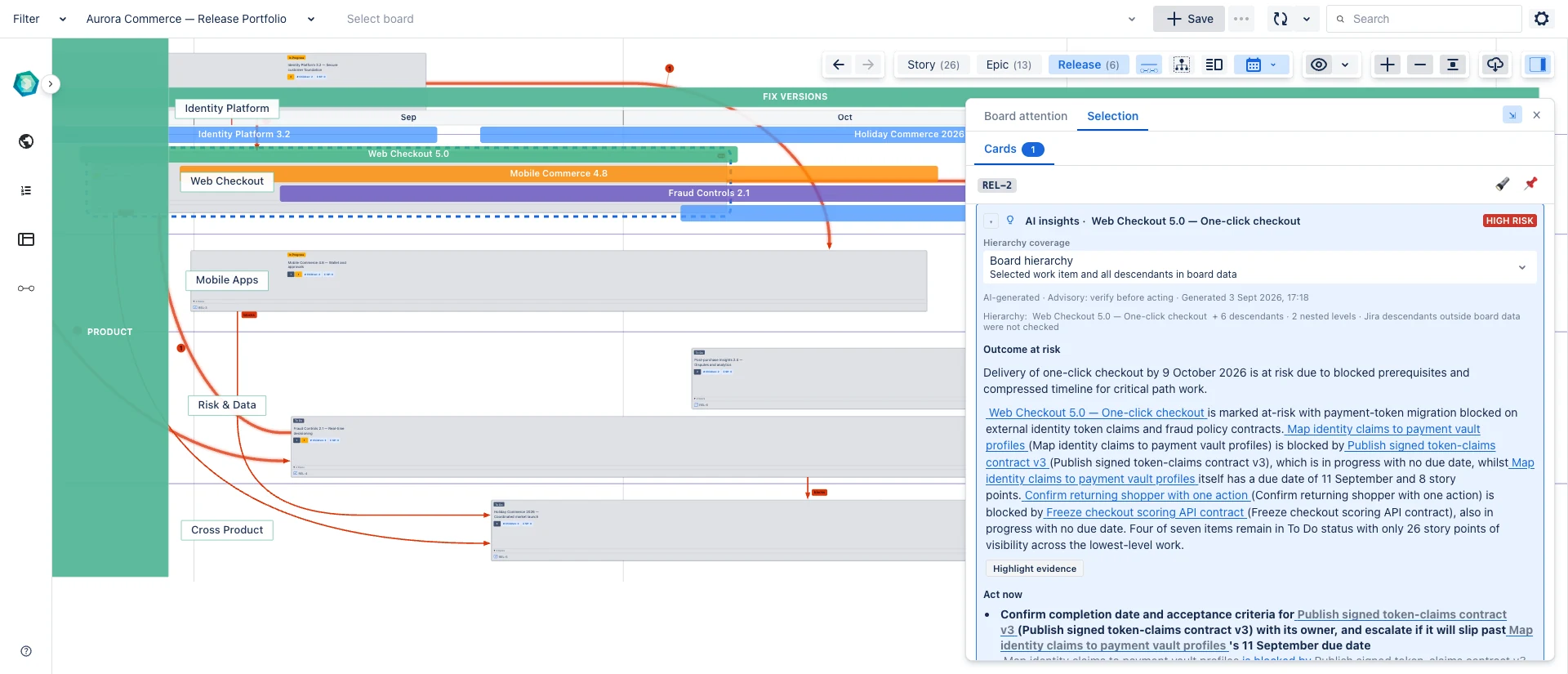
See how work flows between teams. Identify cross-team blockers with styled dependency links, then open the Inspector to triage any link or card without leaving the board. Reduce wait times and improve delivery predictability.

Dependency visualisation → · Inspector for cards & links →

Portfolio & Roadmap Visualisation

Get a big-picture view of initiatives across multiple projects. Roll-ups aggregate child metrics (story points, completion %, blockers) directly on epic and initiative cards, so executives see health at a glance without drilling down.

Roll-ups for parent cards → · Semantic zoom →

Sprint & Release Planning

Plan sprints with full visibility into capacity, dependencies, and priorities. The persistent Search bar finds any work item instantly and zooms the canvas to fit, perfect for live planning sessions where you need to surface and discuss specific items in seconds.

Timeline mode → · Search & zoom-to-fit →

Program Board for SAFe PI Planning

Board Studio is a live program board for Jira (formerly released as Program Board). Visualise features, enablers, and dependencies across Agile Release Trains. Use the Inspector to triage scope during PI Planning, and roll-ups to see ART-level health (story points, status distribution, blockers) without leaving the board view. The big-picture view essential for effective SAFe implementation.

Swimlanes for ARTs → · Roll-ups for PI health →

Trusted by Jira teams

  • Runs on Atlassian

    Your data never leaves Atlassian’s infrastructure

  • CSA STAR registered

    CAIQ self-assessment on Cloud Security Alliance registry

  • GDPR compliant

    EU data protection standards

  • EcoScanner verified

    Atlassian’s automated vulnerability scanning

  • Security Bug Fix SLA

    Committed response times for all severity levels

Your data stays in Atlassian. We don’t store, export, or process your Jira data outside Atlassian’s infrastructure.

How Board Studio compares

CapabilityBoard StudioNative Jira BoardsAdvanced RoadmapsTrello
Build from any Jira field
Yes

No
⚠️
Limited

No
Unlimited swimlanes
Yes
⚠️
Limited

No

No
Advanced dependency visualisation
Yes

No
⚠️
Limited

No
Dependency impact analysis
Yes

No

No

No
Semantic zoom (portfolio to detail)
Yes

No
⚠️
Limited

No
Timeline and Gantt view
Yes
⚠️
Limited

Yes

No
Rollups on parent cards
Yes

No
⚠️
Limited

No
Cross-project views
Yes

Yes

Yes
⚠️
Limited
Nested grouping
Unlimited

No
⚠️
Limited

No
Board sharing
Organisation-wide
⚠️
Project-based
⚠️
Plan-based

Yes
Real-time Jira sync
Automatic

Yes
⚠️
Sandbox

Separate tool
Free tier
Up to 10 users

Free plan

Requires Premium

Free plan

Frequently Asked Questions

Board Studio is a flexible board builder app for Jira Cloud that lets you visualise work items and dependencies in a unified view. It offers unlimited swimlanes, real-time sync with Jira, and organisation-wide sharing capabilities. Unlike native Jira boards, Board Studio lets you see work across multiple projects and teams in a single view.

Yes, Board Studio is built specifically for Jira Cloud. It integrates seamlessly with your Jira instance and syncs data in real-time. The app is available on the Atlassian Marketplace and installs directly into your Jira Cloud environment.

Yes, Board Studio offers a 30-day free trial through the Atlassian Marketplace. No credit card is required to start your trial. Simply install the app from the Marketplace and begin using all features immediately.

Advanced Roadmaps is a timeline and Gantt planning tool, and it needs Jira Premium. Board Studio gives you both views at once: a spatial board with dependency lines, unlimited swimlanes and nested grouping, plus a timeline view that sizes each card to its sprint or date range. You can also zoom from a portfolio overview down to story detail on the same board. Board Studio runs on any Jira Cloud plan, including Free and Standard, with no Premium required.

Yes. Board Studio draws dependency lines between work items, so you can see blockers, predecessors and related work at a glance. You can roll dependencies up between parents, then open any link in the Inspector to read the underlying issues, sort them by risk, and trace a chain across teams. For a release card, the Inspector also lists its inbound blockers, what the release is holding up, and the downstream blast radius. Focus Mode isolates a card and its dependency chain so you can follow one thread at a time. See the Inspector and Focus Mode documentation.

Yes. When you put a date field on an axis, such as Sprint or Fix Versions, Board Studio lays the board out as a timeline. Cards are sized to their sprint or date range, items that run across several sprints stretch to span them, and a date ruler runs along the axis. It works on any Jira Cloud plan. See the Timeline documentation.

Yes. Semantic zoom lets you move through the Jira hierarchy by zooming the board, from a portfolio overview of epics down to individual stories and sub-tasks. Parent cards show rolled-up metrics, and your selection, focus and pins carry across as you change level. See the Semantic Zoom documentation.

Yes. Board Studio aggregates child metrics onto their parents, including story points, status breakdown, completion percentage, blocker counts and custom fields. The rollups recompute as you zoom between levels. See the Rollups documentation.

Yes. A search box in the header finds cards by text and by field, with typeahead as you type. Pick one result, or select every match at once, and the board pans and zooms to fit them. See the Search documentation.

Board Studio supports unlimited nested swimlanes, both horizontal and vertical. You can also nest groupings to create complex hierarchies that match your organisation’s structure. Group by any Jira field including team, sprint, epic, component, priority, or custom fields.

Yes, you can configure boards once and share them organisation-wide. Distribute templates and configurations to teams, groups, or individuals while maintaining a single source of truth. This ensures everyone sees the same view and uses consistent board configurations.

Yes, Board Studio is ideal for SAFe (Scaled Agile Framework) implementations. It’s perfect for PI Planning sessions where you need to visualise features, enablers, and dependencies across Agile Release Trains. The unlimited swimlanes and dependency visualisation make it easy to manage complex SAFe program increments.

Yes. Board Studio is a flexible program board for Jira Cloud, originally released as Program Board and later renamed Board Studio. It gives you a visual program board for PI planning and SAFe Agile Release Trains, with styled dependency lines, unlimited swimlanes, and roll-up metrics across every team and project. It runs on any Jira Cloud plan, including Free and Standard.

Board Studio is fully localised in 27 languages, making it suitable for worldwide teams. The interface automatically adapts to your Jira language settings, ensuring a native experience for all users regardless of location.

No. Board Studio is built on Atlassian technology and runs entirely within Atlassian’s infrastructure. Your Jira data is never transmitted to or stored on external servers.

No. Board Studio is built on Atlassian Forge and runs entirely inside your Atlassian tenant, with no external servers, no data egress, and no new data-processing agreement to review. There is nothing extra to host or secure, so it is admin-light by design and does not carry the vendor overhead of traditional Marketplace apps.

No. The right question is not how big your organisation is, but whether your work connects across projects, teams, or sprints. Even one team spanning a few projects or components gets cross-team dependency clarity that native boards can’t show, and the same board scales up to program level as you grow, with no migration.

Ready to see how your work connects?

Install in under a minute. Build your first board in under five. Free for up to 10 users. Larger teams get a 30-day trial.