
How to Model and Visualise Cross Release Dependencies in Jira Cloud®
Abstract
Cross release dependencies are often treated as a visualisation problem, but the quality of the view depends first on the Jira model beneath it. This guide separates release membership and dates, accountable commitments, hierarchy, shared classification, delivery causality, and presentation into distinct concepts. It explains when Fix Versions are sufficient, when an Epic can represent a release, and when Jira Premium warrants a Release or Release Package level above Epic. It then shows how complete hierarchy data, single-source Blocks links, link roll-ups, upstream and downstream impact analysis, and evidence-based AI insights can create a traceable cross-project release view without duplicating dependency records.
Cross release dependencies in Jira Cloud become difficult when several teams, products, applications and technology stacks must deliver at the same time. Dates alone do not explain causality. Links alone do not explain scope. A useful release view must answer three questions together: what is being delivered, what must happen first, and what becomes exposed when one commitment moves?
The solution starts with modelling, not with choosing a diagram. Jira provides several concepts that are easy to blur together: Fix Versions, work items, hierarchy, Components, custom fields and issue links. Each should carry one kind of meaning.
This guide shows how to separate those concepts, choose the smallest suitable release model, and visualise the same Jira facts at portfolio and delivery level with Board Studio dependency visualisation for Jira Cloud.
Separate the concepts before choosing the view
A sustainable model for cross release dependencies separates six concerns.
- Release membership and calendar dates: use Fix Version. It identifies the project release associated with work and provides version start and release dates.
- Accountable delivery commitment: use a Release work item, Release Package or an existing Epic when the commitment needs its own owner, status, dates and dependencies.
- Scope containment: use Jira’s native parent hierarchy. Do not use Blocks links to mean that a Story belongs to an Epic or release.
- Delivery causality: use native Blocks / is blocked by links for genuine sequencing constraints between work items.
- Shared business classification: use global fields such as Product, Technology Stack, Team or Value Stream when several projects need one common vocabulary.
- Presentation and analysis: use Jira Plans for hierarchy and scheduling, then a dependency-focused view when people need to reorganise the same facts by time, product, team or technology without changing the underlying model.
This separation prevents one field from carrying several incompatible meanings. It also makes each line on a release map explainable.
Choose the smallest release model that preserves the decision
There is no reason to add a custom hierarchy level to every Jira site. Choose according to the decision the organisation must make.
Use Fix Versions without a Release work item
This is enough when a release is primarily a date and membership label inside one project. Teams can plan the work in Jira and compare version dates without treating the release as an object with its own workflow.
Use an Epic as the releasable commitment
This works when one Epic already represents one independently releasable outcome. Add Product, Technology Stack or Team where needed, and link Epics only when the dependency genuinely exists at that level.
Add Release or Release Package above Epic
Use Jira Premium hierarchy when one commitment coordinates several Epics, teams, products or projects. A practical hierarchy is:
Release or Release Package → Epic or Feature → Story, Bug or Task
The Release work item now owns the commitment. Fix Version still carries release membership and dates. The hierarchy carries scope. Blocks links carry causality. Product or Technology Stack carries classification.
Build a cross release dependency map from complete Jira data
When dependencies can originate below the release level, the board’s Jira filter must load the complete relevant hierarchy. A filter containing only Release work items cannot expose Story links that were never loaded. To visualise cross release dependencies accurately, load the work items where those relationships are recorded.
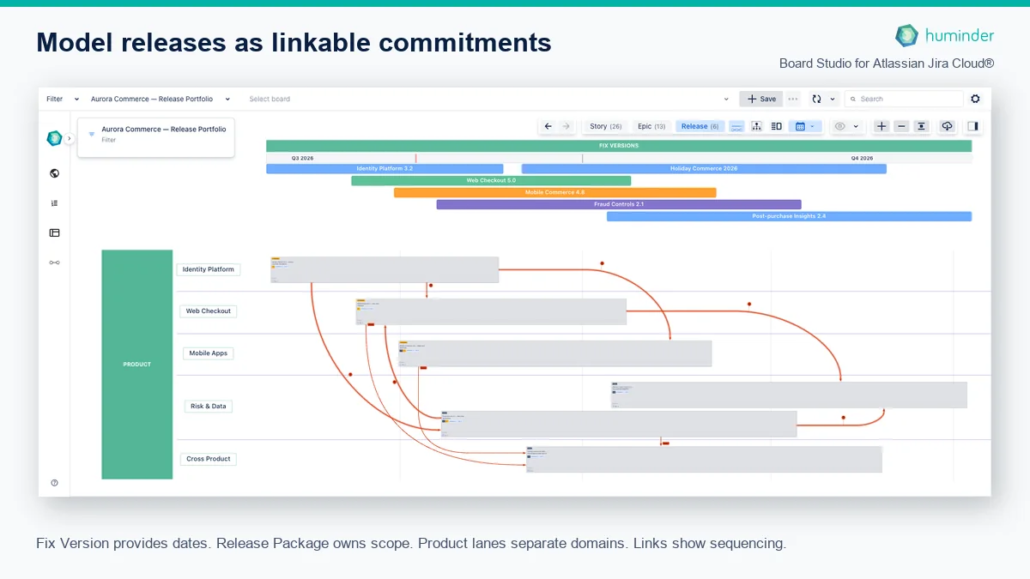
The illustrative portfolio below contains 6 Release Packages, 13 Epics and 26 Stories across 5 projects. It uses a global Product field to align work from identity, checkout, mobile, risk and cross-product domains. The same structure could use Technology Stack for API and application releases, Team for organisational hand-offs, or Value Stream for enterprise planning.
To create the release map in Board Studio:
- Select a Jira filter that returns every relevant Release, Epic and Story.
- Select Release in the counted semantic level picker.
- Open Board Structure for the Release level and choose Board layout.
- Add Fix Versions under Horizontal swimlanes and select Switch to timeline.
- Add Product, Technology Stack or another shared classifier under Vertical swimlanes.
- In Links, show outward blocks and hide inward is blocked by. This displays each Jira link once.
- Enable Show links rolled up from child items beside the semantic level picker.
- Set the Date ruler to Always on.
The result combines accountable releases, real dates, parallel lanes and dependency direction without creating a separate release database. Learn more about real-date Jira timelines and dependency visualisation in the Board Studio documentation.
Record one Jira link for one dependency fact
The most important governance rule is to record each dependency once, at its lowest meaningful level.
If one Story in an identity service blocks a Story in checkout, record that technical dependency between those Stories. Do not copy it manually onto both Epics and both Releases. Four links would then describe one fact, and the copies would eventually disagree.
A direct Release link remains valid when it represents a different fact, such as a release approval gate or coordinated market launch. The distinction is:
- Technical dependency: record it where the implementation constraint exists, then roll it up.
- Release governance dependency: record it directly between the accountable Release work items.
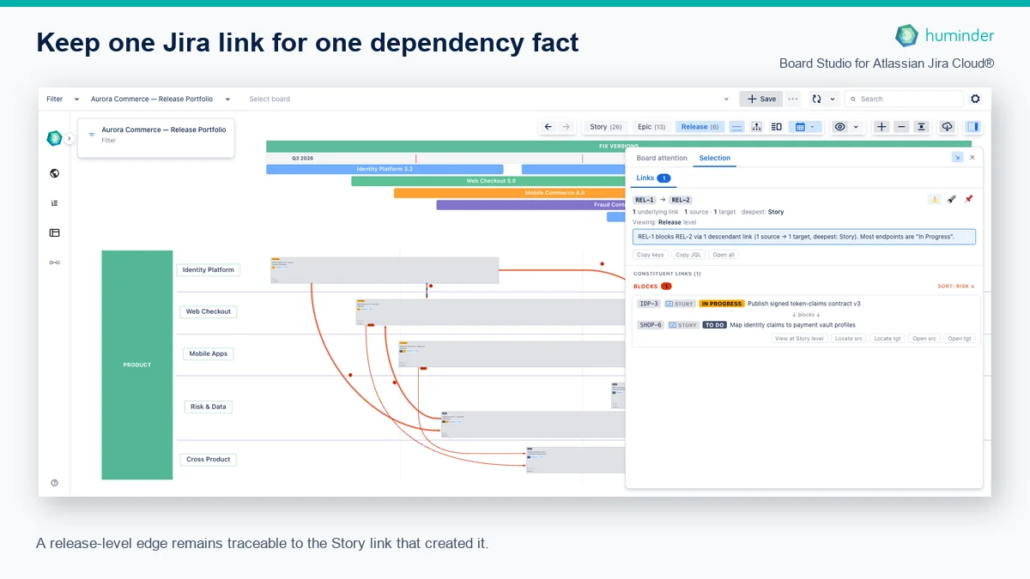
Board Studio can aggregate child links at Release level while retaining their constituent Jira evidence. Selecting the aggregate edge exposes the source and target Story, status, direction and navigation back to the delivery level. The release view stays readable without becoming an unexplained diagram.
Analyse what must ship first and what a delay exposes
A map of cross release dependencies answers where a relationship sits. Operational decisions need both sides of the selected commitment.
- Upstream impact: which prerequisites must complete before this release is safe?
- Downstream impact: which releases and delivery items become exposed if it moves?
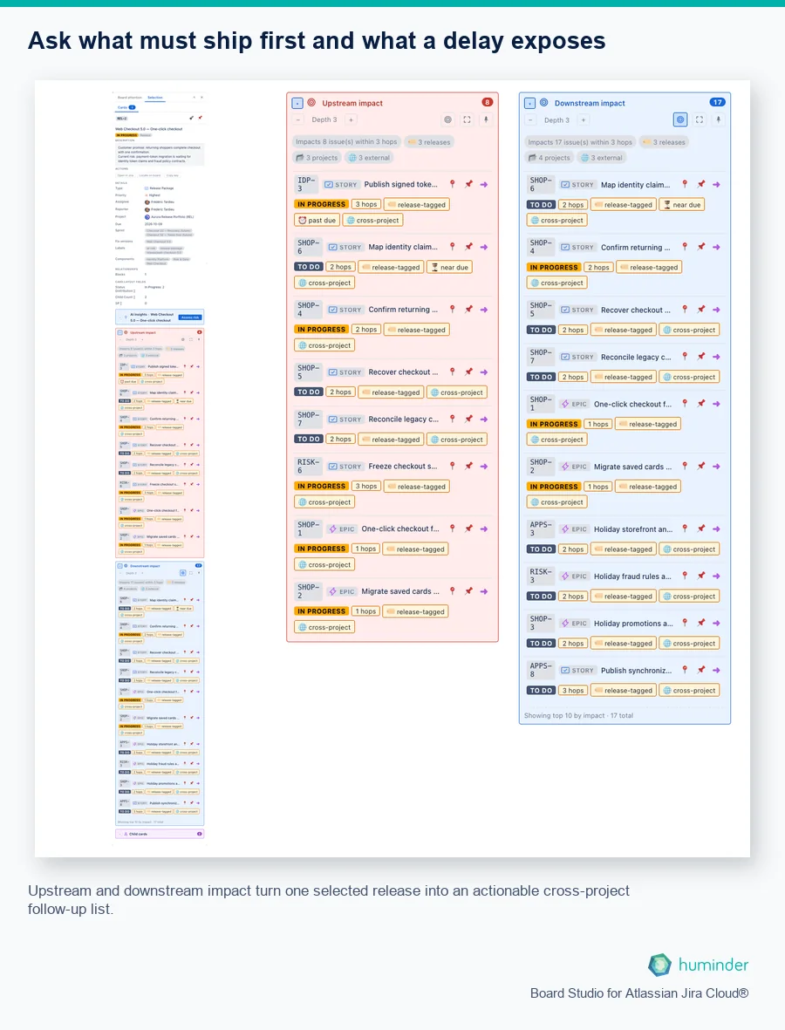
Select a Release card, open the Selection Inspector, expand both impact sections and choose the traversal depth. Depth 1 answers the immediate deployment question. A deeper traversal exposes connected Epics and Stories across projects. Use Show impact on board and Frame impacted cards in the viewport to relate the list back to the release map.
In the example, depth 3 finds 8 upstream and 17 downstream work items. The release owner can move from a portfolio concern to the specific delivery items and projects that need follow-up. See the complete Board Studio Inspector guide for impact analysis and evidence navigation.
Use AI only after the Jira evidence is explicit
AI should not invent missing dependencies or decide which Jira concept means release scope. Those are modelling choices owned by people.
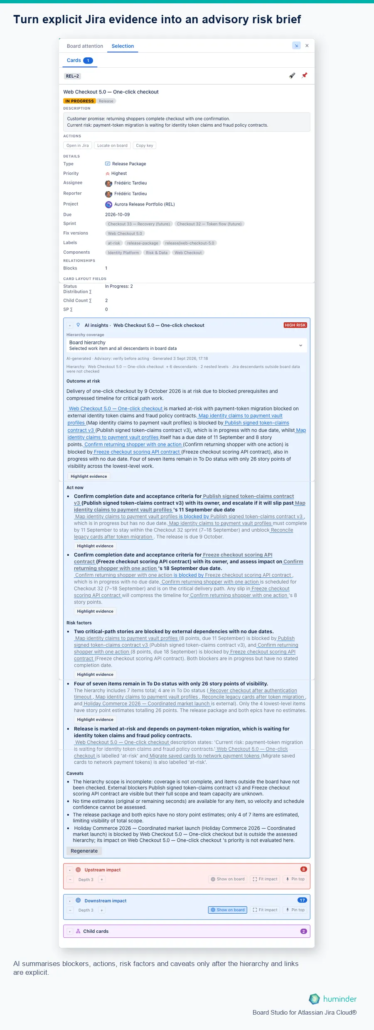
Once hierarchy, dates, status and Blocks links are explicit, AI can turn the selected evidence into a decision brief. Board Studio AI insights separates four outputs:
- Outcome at risk: the commitment and date that may be affected.
- Act now: specific follow-up actions tied to named work items.
- Risk factors: blockers, missing dates, incomplete estimates and compressed sequencing.
- Caveats: board coverage, missing data and evidence outside the assessed hierarchy.
The assessment remains advisory. People can verify the evidence, highlight it on the board and decide whether missing data changes the conclusion. This preserves human accountability while reducing the work needed to assemble a release-risk brief.
Keep Jira Plans and critical path claims in perspective
Jira Plans can remain the canonical hierarchy and scheduling view. Board Studio complements it when release owners need a dependency-focused board that reorganises the same Jira work by dates, products, teams or technology stacks while preserving link provenance and impact.
A visible blocking chain is not automatically a formal critical path. Critical path calculation also requires reliable durations, calendars, resource assumptions and scheduling constraints. When those inputs are absent, call the result a dependency and impact map.
Cross release dependency modelling checklist
- Decide whether release means a date label, an Epic outcome or an accountable multi-Epic commitment.
- Keep Fix Version responsible for release membership and dates.
- Use native Jira hierarchy for scope.
- Use Blocks links only for genuine causality.
- Classify work with shared Product, Technology Stack, Team or Value Stream fields where projects need one vocabulary.
- Load the complete hierarchy when lower-level links must appear at Release level.
- Display only one direction of each Jira link.
- Record each dependency once and retain its constituent evidence.
- Use impact analysis to connect release risk with actionable delivery work.
- Keep AI advisory and explicit about missing data and coverage.
Frequently asked questions about Jira release dependencies
Can Jira Fix Versions depend on each other?
Jira Fix Versions carry release membership and dates, but they do not have native Blocks relationships. Represent the release as a work item when it must own dependencies.
Should Release Package always be a custom Jira hierarchy level?
No. Use an existing Epic when it already represents one releasable outcome. Add Release Package above Epic only when one accountable commitment genuinely coordinates several Epics, products, teams or projects.
Why must a release dependency filter load child work items?
Child Stories and their links must be present in the board data before a visualisation can roll those dependencies up to Release level and preserve their evidence.
Why show only one direction of Blocks links?
Blocks and is blocked by are the two directions of the same Jira relationship. Showing both can make one dependency appear twice.
Is a Jira dependency map the same as a critical path?
No. A dependency map shows sequencing and impact. A formal critical path also needs dependable durations, calendars and scheduling constraints.
Should teams use Jira Plans or Board Studio?
They serve complementary decisions. Jira Plans provides hierarchy and scheduling. Board Studio provides configurable dependency views, link roll-up evidence, impact analysis and an Inspector that connects release-level concerns to delivery work.
