
This guide takes you from the empty Board Studio welcome screen to a useful Jira board with a Sprint timeline, Project rows, visible blockers, and a reusable name.
Overview
Creating your first board involves four steps:
- Select a data source.
- Add a Sprint timeline and Project swimlanes.
- Choose which dependency directions to show.
- Name and save the board.
The example uses the Northstar Treasury saved filter, but the same steps work with any Jira Space or Filter available to you.
Step 1: Select a data source
Use the two selectors in the header:
- Choose Space for one Jira project or Filter for a saved JQL filter.
- Open the selector beside it and choose the specific Space or Filter.
- Wait for the cards and links to appear.
Board Studio loads the matching work items automatically. You do not need to select Update for the initial load.
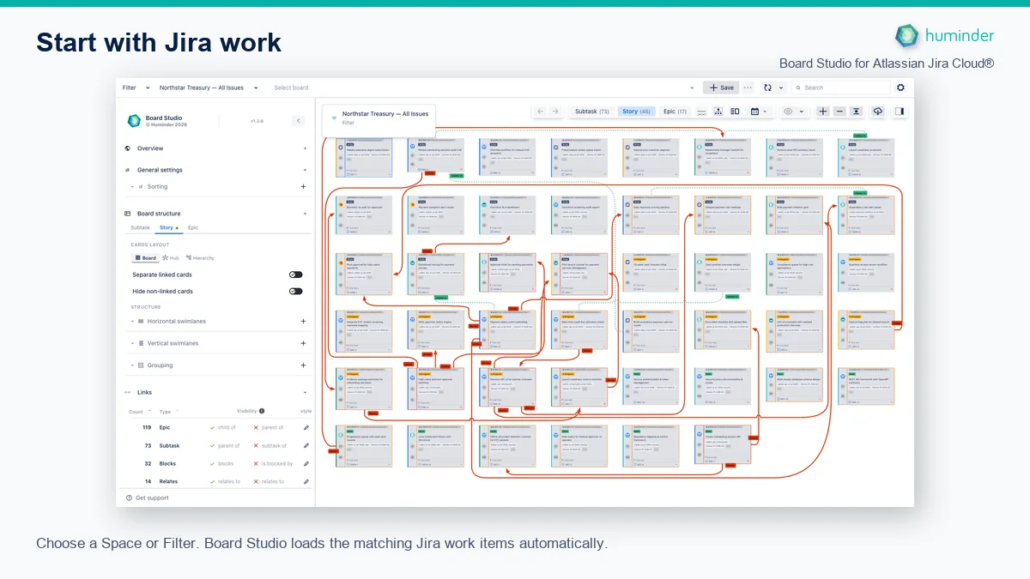
Choose a Space or Filter. Board Studio loads the matching Jira work items automatically.
Tip: Start with a Space for a simple team board. Use a Filter when you need cross-project planning or a narrower JQL scope.
Step 2: Configure the board structure
The Board Structure section controls how work is arranged at the active hierarchy level. For a practical first view:
- Under Horizontal swimlanes, add Sprint.
- Select Switch to timeline on the Sprint dimension.
- Under Vertical swimlanes, add Project.
The Sprint timeline creates proportional date columns across the board. Project creates rows, making cross-project delivery easier to scan.
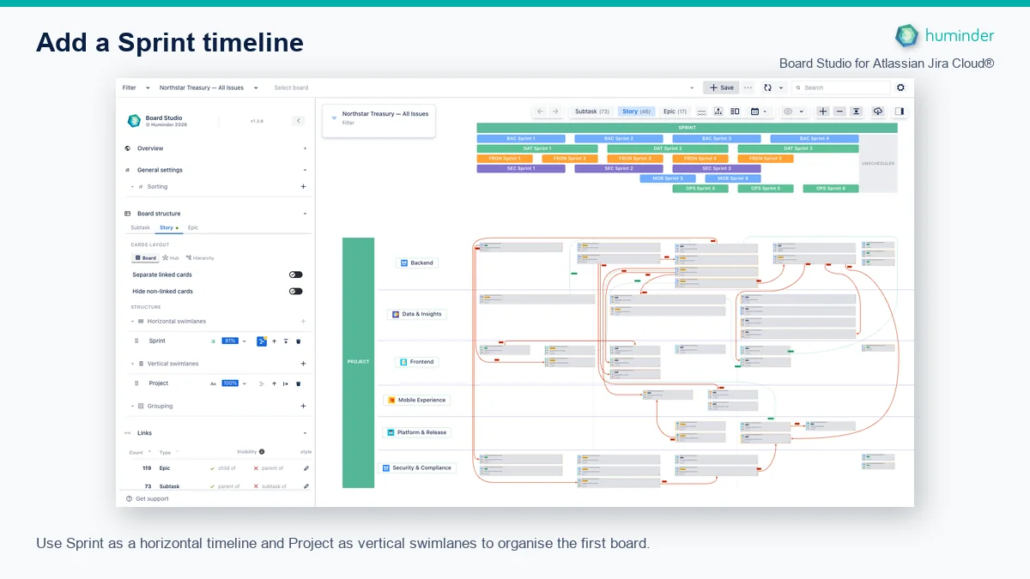
Use Sprint as a horizontal timeline and Project as vertical swimlanes to organise the first board.
Note: Board Studio’s swimlane names describe the dividing lines. Horizontal swimlanes create columns, while vertical swimlanes create rows.
Step 3: Configure links
Open the Links section. Every discovered Jira link type has independent outward and inward controls.
For this example, enable outward blocks links and leave is blocked by hidden. The board immediately shows the selected direction without moving the cards.
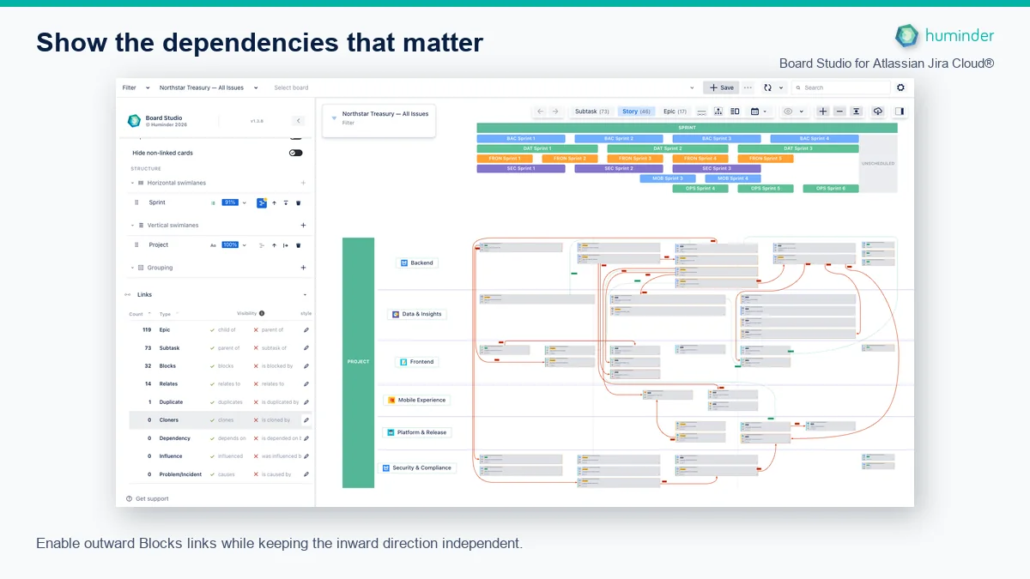
Enable outward Blocks links while keeping the inward direction independent.
Choose only the directions that answer your current planning question. You can return later and enable more link types or edit their style.
Step 4: Name and save the board
When the board has unsaved changes:
- Select Save with the plus icon in the header.
- Enter a descriptive board name.
- Select the blue Save button with the checkmark.
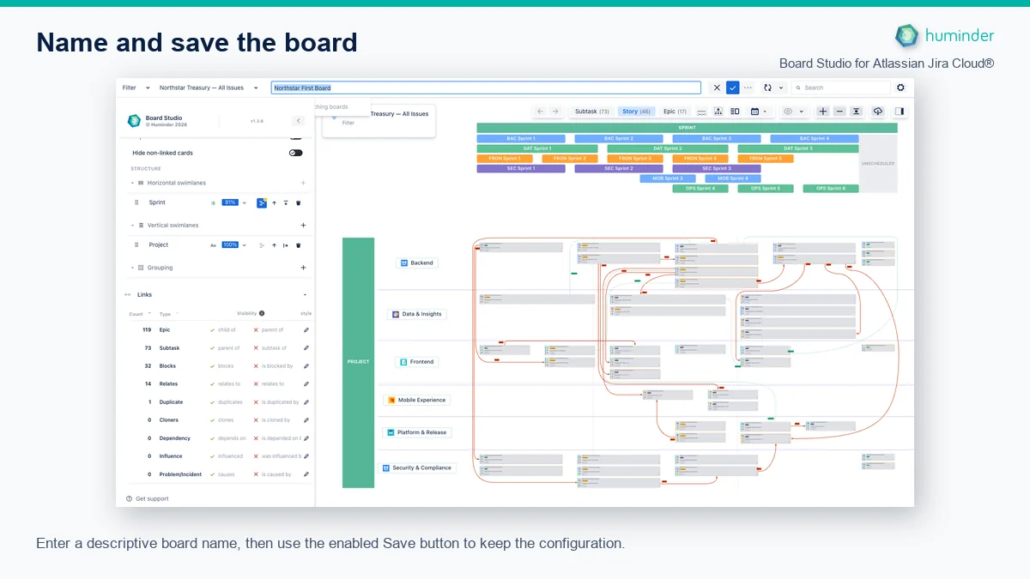
Enter a descriptive board name, then use the enabled Save button to keep the configuration.
The example name is Northstar First Board. Your saved board keeps its data source, structure, link visibility, and other configuration choices so you can load the same view again.
Next steps
- Data Sources: refine the Jira work included on the board.
- Board Configuration: add grouping, sorting, and more dimensions.
- Links: configure visibility, styles, and dependency roll-ups.
- Managing Configurations: rename, share, copy, or delete saved boards.