
Card roll-ups turn the child issues under a Jira parent into a compact set of metrics on that parent’s card. They let delivery leads compare several epics or initiatives without opening each backlog and counting issues by hand.
What a roll-up measures
At each hierarchy level, Board Studio calculates metrics from the parent’s immediate children in the loaded data:
- An Epic card can summarise its Stories and Tasks.
- An Initiative card can summarise its child Epics.
- A Story card can summarise its Sub-tasks.
The calculation is level-specific. For example, Story Points on an Initiative card sums points stored on its child Epics. It does not automatically reach through those Epics and sum every Story. Configure each parent level with metrics that make sense for its immediate children.
Board Studio reads Jira’s parent-child relationships and updates the values when the board data is refreshed. A roll-up appears only on a card that has children in the loaded data.
Built-in metrics
Six ready-made metrics cover the most common Jira delivery questions:
| Metric | What it answers | Calculation |
|---|---|---|
| Child Issues | How much scope sits under this parent? | Number of immediate children. |
| Story Points | How much estimated effort sits under this parent? | Sum of Story Points on immediate children. Children without points do not add to the total. |
| Status | Where is the work in the workflow? | Counts grouped by Jira status category, using Jira colours for To Do, In Progress and Done. |
| Completion | How far through the child scope are we? | Percentage of immediate children in Jira’s Done status category. |
| Blocked Issues | Which parents need attention? | Number of immediate children marked with Jira’s Flagged field. |
| Cross-Dependencies | How much coordination reaches outside this parent? | Number of distinct linked issue keys outside the immediate child set. |
Important: Blocked Issues uses Jira’s Flagged field. It does not infer a blocker from status names or count incoming “blocks” links.
Configure and verify a parent card
Card layouts are configured separately for each Jira hierarchy level. The following sequence configures an Epic card, previews it, then verifies the result on the board.
1. Open the parent-level card layout
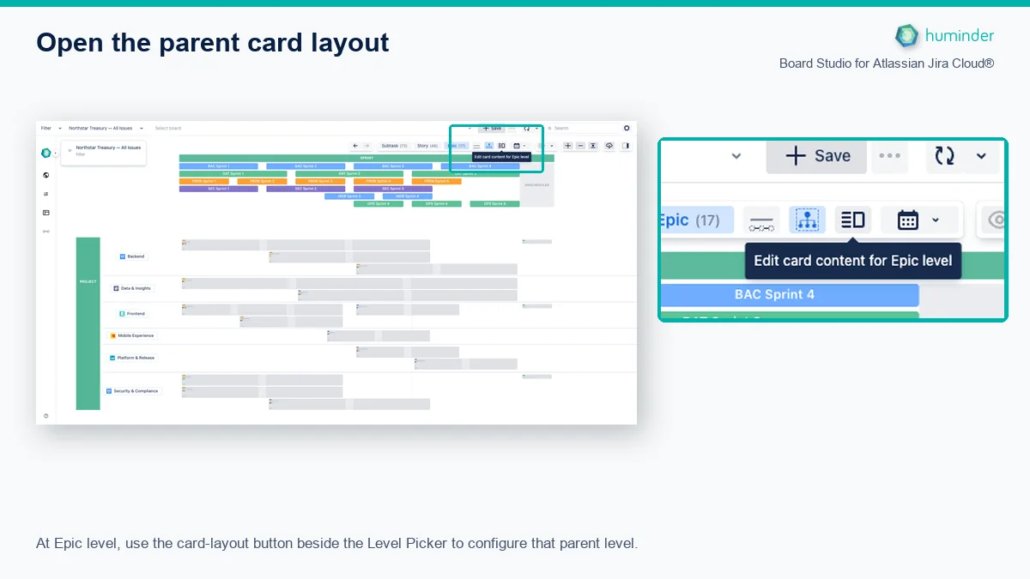
At Epic level, use the card-layout button beside the Level Picker to configure that parent level.
- Use the Level Picker to switch the board to the parent level you want to configure, such as Epic.
- Click the Edit card content for Epic level button beside the Level Picker. The tooltip names the active level.
- Open the Rollups tab in the Card layout dialog.
2. Add and arrange the roll-ups
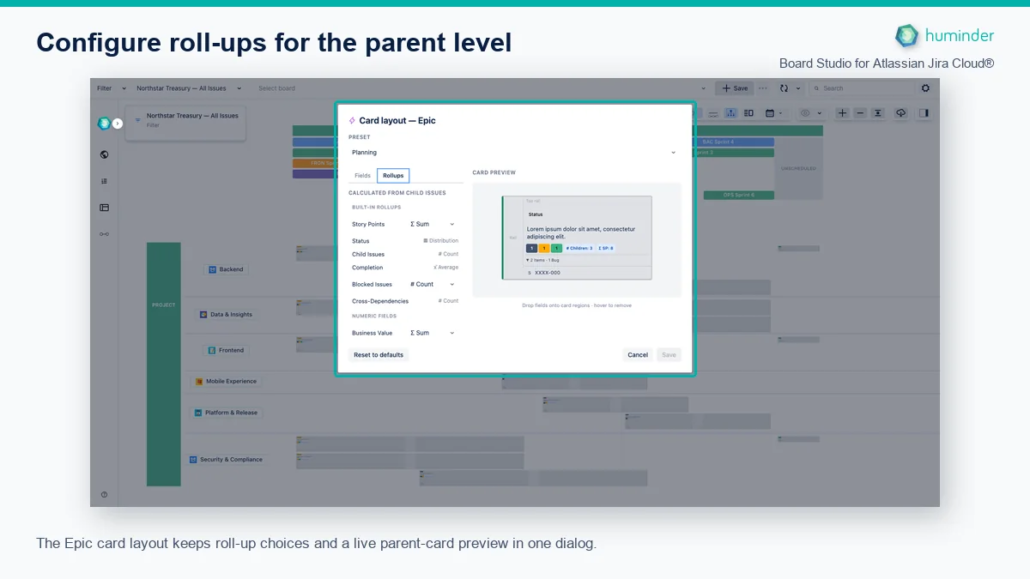
The Epic card layout keeps roll-up choices and a live parent-card preview in one dialog.
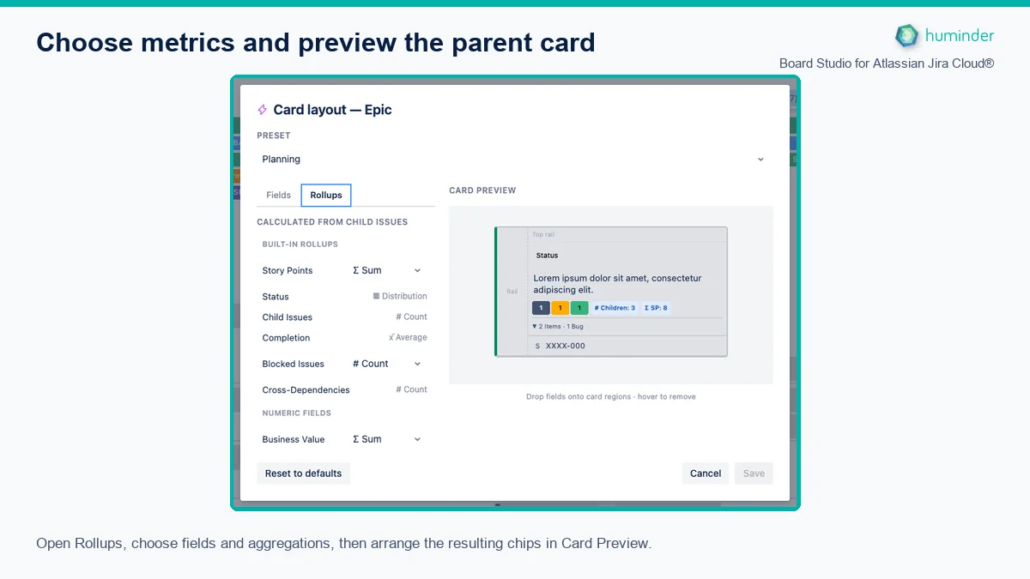
Open Rollups, choose fields and aggregations, then arrange the resulting chips in Card Preview.
- Choose an operation when the field offers more than one.
- Click a metric to add it, or drag it into the card preview.
- Arrange the metrics in Card Preview and remove anything that does not help the intended decision.
- Check the parent card in the preview before saving.
- Click Save. The parent cards update while the board keeps its current viewport.
Use Reset to defaults to restore the default card for that hierarchy level. Cancel closes the dialog without applying the draft.
3. Inspect the contributing Stories
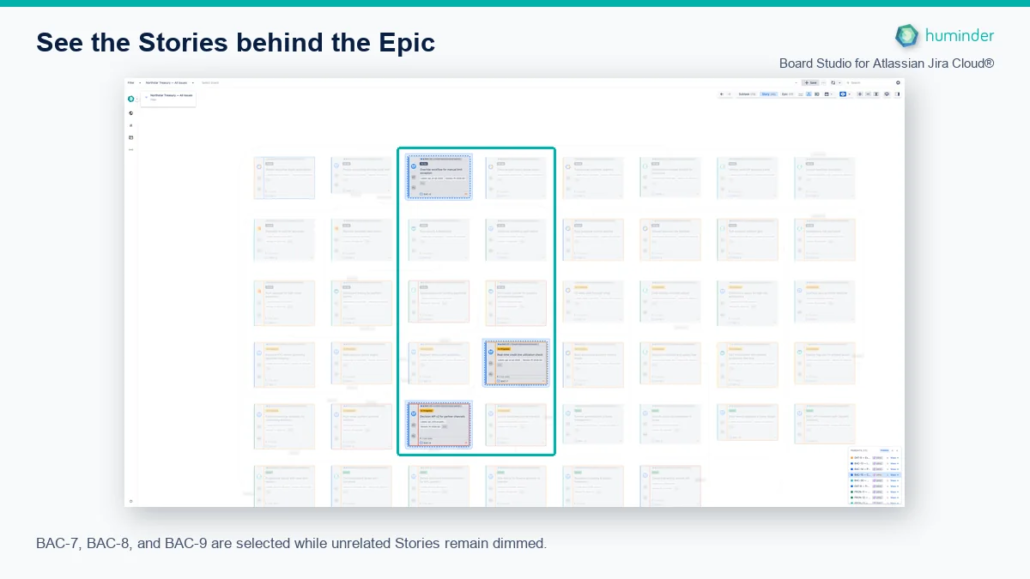
BAC-7, BAC-8, and BAC-9 are selected while unrelated Stories remain dimmed.
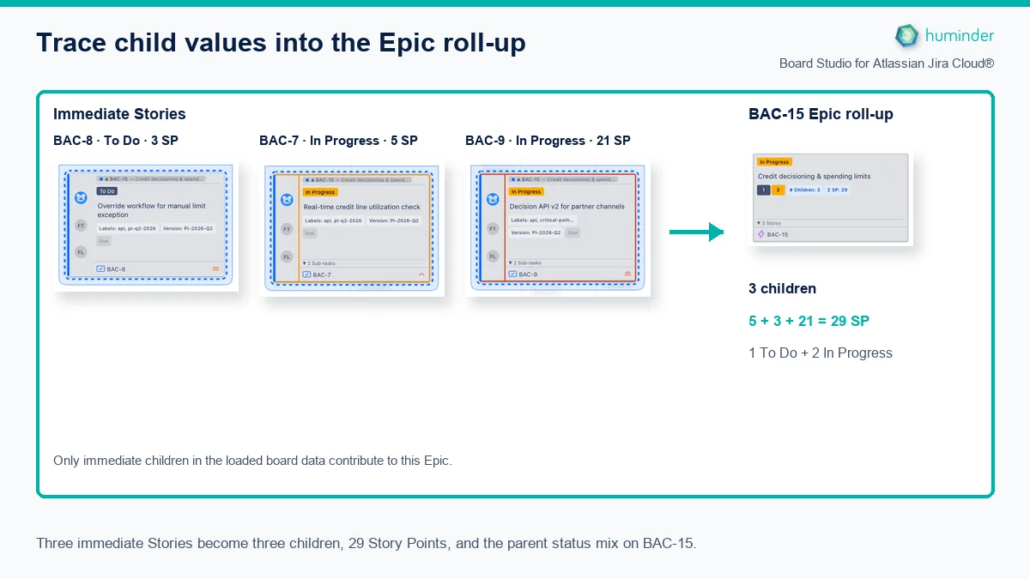
Three immediate Stories become three children, 29 Story Points, and the parent status mix on BAC-15.
BAC-15 has three immediate Stories in the loaded board data:
- BAC-8 is To Do with 3 Story Points.
- BAC-7 is In Progress with 5 Story Points.
- BAC-9 is In Progress with 21 Story Points.
These values produce the Epic metrics directly: 3 children, 5 + 3 + 21 = 29 Story Points, and a status mix of 1 To Do and 2 In Progress. Unrelated Stories are dimmed in the context view so the contributing set remains visible without removing the surrounding board.
4. Verify the resulting parent cards
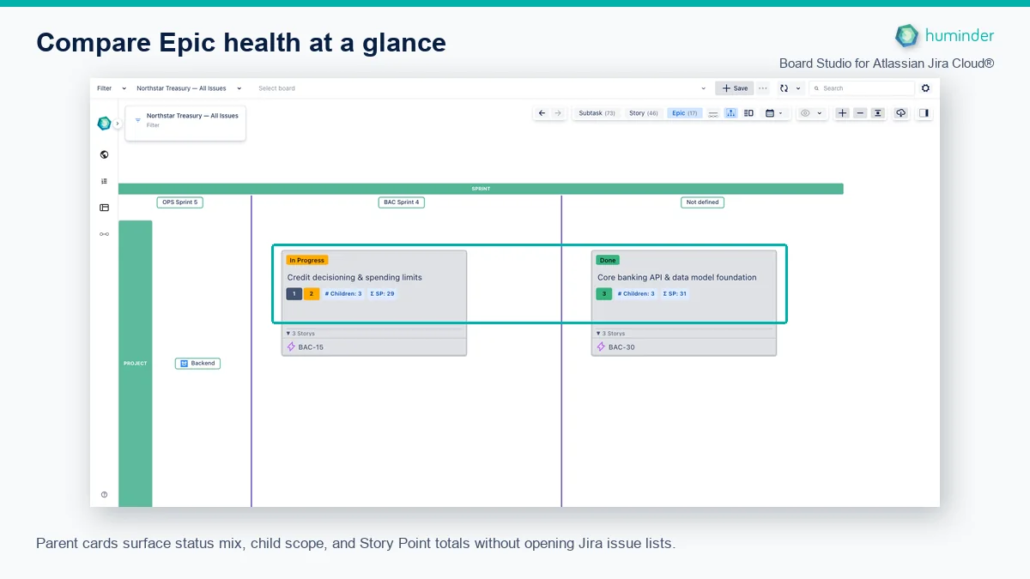
Parent cards surface status mix, child scope, and Story Point totals without opening Jira issue lists.
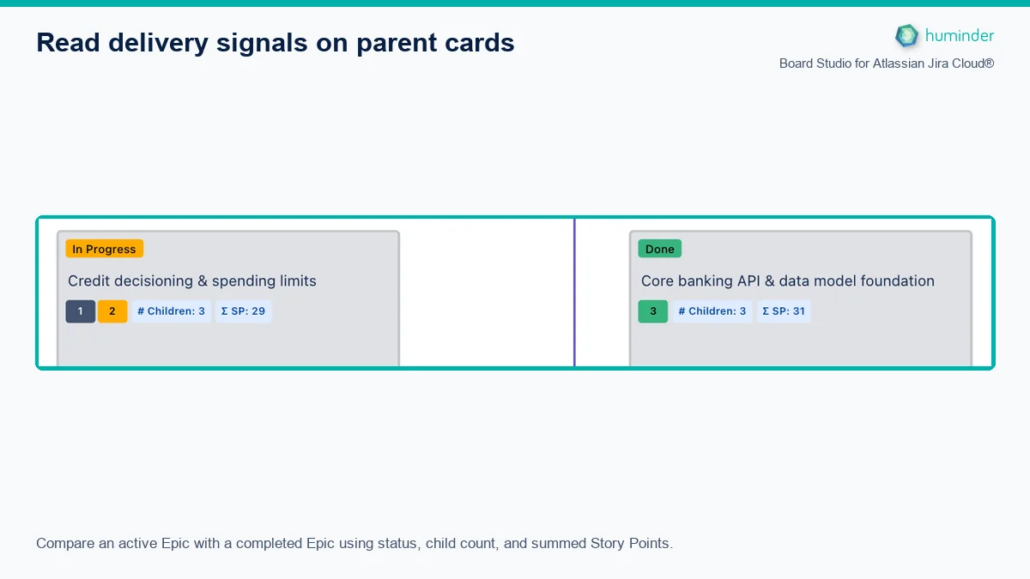
Compare an active Epic with a completed Epic using status, child count, and summed Story Points.
The board result uses the same Epic card configuration shown in the dialog. BAC-15 is in progress and BAC-30 is done. Each card keeps its own status and summary, then adds roll-ups from its direct Stories:
- The coloured number chips show the number of Stories in each Jira status category.
- # Children is the direct Story count.
- Σ SP is the sum of Story Points on those Stories.
Both Epics contain three Stories and have similar estimated scope, but their delivery states are completely different. This is the comparison the configured parent card is designed to make visible.
Recommended parent card recipes
Do not put every available metric on every card. Start with the decision the card should support, then keep the three to five metrics that answer it.
Epic delivery health
Use this card in stand-ups, delivery reviews and release readiness checks.
| Add to the card | Pain point addressed |
|---|---|
| Completion | The Epic’s own status can stay unchanged while its Stories move. Completion exposes actual child progress. |
| Status distribution | A single percentage can hide whether work is waiting or actively moving. The distribution shows the flow. |
| Blocked Issues | Flagged Stories are easy to miss inside a large backlog. The count makes affected Epics stand out. |
| Story Points, Sum | Replaces manual addition when comparing planned scope across Epics. |
| Cross-Dependencies | Highlights Epics with greater coordination risk outside their own child set. |
Add Child Issues when issue count is an important companion to Story Points. A high issue count with modest points can reveal fragmented scope or inconsistent estimation.
Portfolio progress
Use this card on Initiative or other higher-level parents.
| Add to the card | Why it helps |
|---|---|
| Child Issues | Shows how many Epics or equivalent work items make up the Initiative. |
| Completion | Reports the share of those direct children that Jira considers Done. |
| Status distribution | Distinguishes Initiatives that have started broadly from those with most Epics still waiting. |
| Cross-Dependencies | Surfaces coordination pressure beyond the Initiative’s immediate scope. |
Avoid Story Points, Sum at this level unless your organisation estimates the direct child items themselves. The roll-up does not invent estimates or recursively total lower levels.
Capacity and ownership
Use these metrics to expose overloaded or fragmented ownership:
| Add to the card | What to look for |
|---|---|
| Assignee, Distinct | A very low number can indicate concentration on one person. A very high number can signal coordination overhead. |
| Assignee, Distribution | Shows how child work is spread between the populated assignees. |
| Components, Distinct | Reveals how many technical areas the parent crosses. |
| Team, Distinct, when a Team field is available | Highlights work spanning several delivery teams. |
Missing assignees are excluded, so use this view to understand populated ownership rather than as an unassigned-work counter.
Scope and priority mix
Use this card during refinement and scope review:
| Add to the card | What it reveals |
|---|---|
| Issue Type, Distribution | The mix of Stories, Tasks, Bugs and other child types. |
| Priority, Distribution | Whether urgent work is concentrated under a parent. |
| Labels, Distinct | How many labelled concerns or themes the scope crosses. |
| Story Points, Average | Large differences between Epics can reveal inconsistent slicing. |
Schedule exposure
Use date roll-ups when child issues carry meaningful dates:
| Add to the card | What it reveals |
|---|---|
| Due Date, Min | The earliest populated child deadline. |
| Due Date, Max | The latest populated child deadline. |
| Due Date, Range | The full span between the earliest and latest populated deadlines. |
Date roll-ups summarise populated dates. They do not mark dates as overdue or infer a forecast, so pair them with Status or Completion when assessing delivery risk.
Roll up eligible Jira fields
The Rollups tab also offers eligible system and custom Jira fields. Board Studio uses each field’s schema to offer sensible operations:
| Field kind | Available operations | Useful examples |
|---|---|---|
| Numeric | Sum, Average, Min, Max | Story Points, cost, estimate, risk score. |
| Categorical | Distribution | Status, Priority, Issue Type, Resolution, single-select fields. |
| Multi-value | Distinct, Distribution | Labels, Components, Fix Versions, multi-select fields. |
| Date or date-time | Min, Max, Range | Due Date, Created, target dates. |
| Boolean | Count | Custom checkboxes and true or false risk flags. |
| People | Distinct, Distribution | Assignee, Reporter, Creator and user fields. |
| Eligible text | Distinct | Controlled custom text values. |
Fields that cannot produce a meaningful aggregate, such as Summary and Description, are not offered. Empty values do not contribute to numeric, date, distinct or distribution results.
Read the metric chips
| Symbol | Meaning |
|---|---|
| Σ | Sum |
| x̄ | Average |
| ↓ | Minimum or earliest date |
| ↑ | Maximum or latest date |
| # | Count |
| #≠ | Distinct count |
| ▦ | Distribution |
| ↔ | Range |
Hover over a metric to see its field and operation. Hover over a distribution segment to see the value represented by that segment and its count.
Practical limits
- Roll-ups use only immediate children present in the loaded board data.
- Missing field values are ignored. A total can therefore be accurate for populated values while still exposing incomplete Jira data.
- A zero or empty dynamic metric may not display a chip.
- Distribution metrics can become crowded when a field has many values. Prefer Distinct for a compact signal, then inspect Jira when you need the full list.
- Cross-Dependencies counts distinct linked issues outside the child set. It is a coordination signal, not a count of individual links by type.
- Card roll-ups summarise fields. Dependency roll-ups are a separate feature that combines child links into aggregate edges between parent cards.
Work with the rest of the board
- Use Semantic Zoom to move between the parent summary and its child detail.
- Use Parent Context to isolate the children belonging to one parent.
- Use Focus Mode to investigate a parent card and its dependency neighbourhood.
- Use Auto Update to refresh Jira data and recalculate the displayed metrics.